Best Thermostats for Home Use: Top Smart Models That Save Energy and Prevent Costly Problems
Best Thermostats for Home Use
Heating and cooling costs are one of the largest ongoing expenses for homeowners. A modern thermostat can help regulate temperature, improve comfort, reduce utility bills, and protect your home from expensive temperature-related damage.
Older thermostats often lack scheduling, automation, and remote monitoring features. Today’s smart thermostats allow homeowners to monitor their homes from anywhere and receive alerts if temperatures drop too low or rise too high.
Choosing the right thermostat is one of the simplest upgrades that can improve comfort while reducing long-term costs.
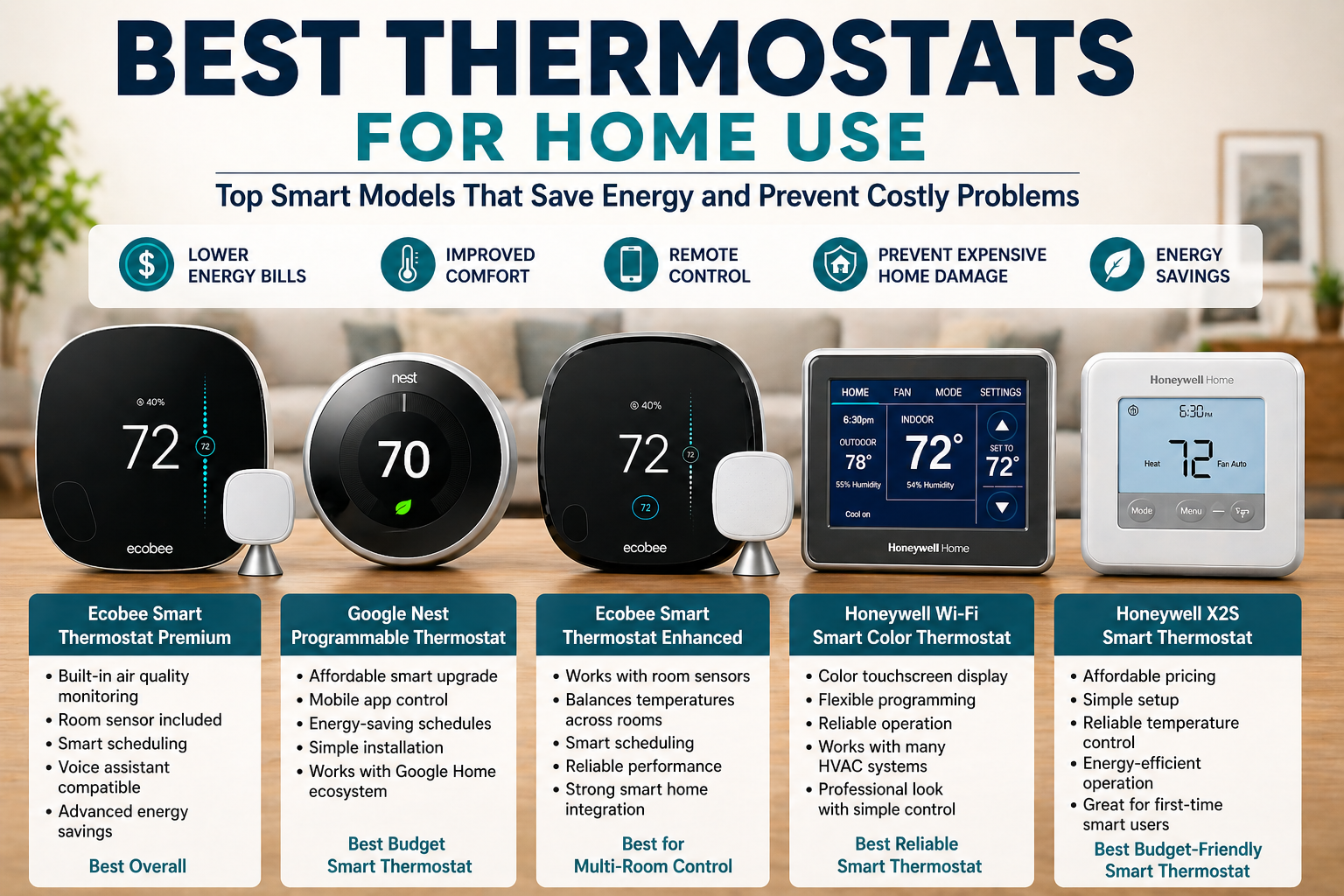
Quick Comparison of the Best Thermostats
| Thermostat | Type | WiFi | Best For | Price Range |
|---|---|---|---|---|
| Ecobee Smart Thermostat Premium | Smart | Yes | Premium features | $$$ |
| Google Nest Programmable Thermostat | Smart | Yes | Budget smart upgrade | $$ |
| Ecobee Smart Thermostat Enhanced | Smart | Yes | Multi-room homes | $$$ |
| Honeywell Wi-Fi Smart Color Thermostat | Smart | Yes | Reliability | $$ |
| Honeywell X2S Smart Thermostat | Smart | Yes | Budget installs | $ |
This quick overview helps you compare key features before exploring each option in detail.
Best Thermostats for Homeowners
1. Best Overall Smart Thermostat
Ecobee Smart Thermostat Premium
Key features:
Built-in air quality monitoring
Room sensor included
Smart scheduling
Voice assistant compatibility
Energy-saving automation
Best for homeowners who want top-tier performance and comfort control.
2. Best Budget Smart Thermostat
Google Nest Programmable Thermostat
Key features:
Affordable smart upgrade
Mobile app control
Energy-saving schedules
Simple installation
Best for homeowners who want smart features at a reasonable price.
3. Best for Multi-Room Temperature Control
Ecobee Smart Thermostat Enhanced
Key features:
Works with room sensors
Balances temperatures across rooms
Smart scheduling
Reliable performance
Best for larger homes or homes with uneven temperatures.
4. Best Reliable Smart Thermostat
Honeywell Wi-Fi Smart Color Thermostat
Key features:
Color touchscreen display
Flexible programming
Reliable operation
Works with many HVAC systems
Best for homeowners who want simple, dependable control.
5. Best Budget-Friendly Smart Thermostat
Honeywell X2S Smart Thermostat
Key features:
Affordable pricing
Simple setup
Reliable temperature control
Energy-efficient operation
Best for first-time smart thermostat users.
Installation Difficulty Table
Before purchasing a thermostat, it’s important to understand how easy installation will be.
| Thermostat | Installation Difficulty | DIY Friendly | C-Wire Required |
|---|---|---|---|
| Ecobee Smart Thermostat Premium | Moderate | Yes | Usually |
| Google Nest Programmable | Easy | Yes | Sometimes |
| Ecobee Smart Thermostat Enhanced | Moderate | Yes | Usually |
| Honeywell Wi-Fi Smart Color | Moderate | Yes | Usually |
| Honeywell X2S Smart Thermostat | Easy | Yes | Yes |
Many homeowners can install smart thermostats themselves, but checking wiring compatibility is important.
HVAC Compatibility Guide
Not all thermostats work with every heating and cooling system.
Most thermostats are compatible with:
Central HVAC systems
Heat pump systems
Gas furnaces
Electric systems
Multi-stage HVAC systems
Systems that may require professional installation:
Multi-zone HVAC systems
High-voltage heating systems
Older HVAC systems
Electric baseboard heaters
Always check compatibility before purchasing a thermostat.
Real Energy Savings Examples
Smart thermostats can significantly reduce energy usage over time.
Typical savings include:
Heating cost reduction: 10%–12%
Cooling cost reduction: 10%–15%
Annual savings: $100–$250
Savings vary depending on home size, insulation quality, and usage habits.
Where Thermostats Help Prevent Home Damage
Thermostats do more than control temperature—they help protect your home.
They help prevent:
Frozen pipes in winter
Overheating during summer
Excess humidity buildup
Temperature damage during vacations
Unnecessary HVAC wear
Maintaining stable temperatures protects both comfort and home structure.
Common Mistakes When Choosing a Thermostat
Avoiding common mistakes helps ensure you select the right device.
Common mistakes include:
Buying incompatible models
Ignoring HVAC compatibility
Choosing overly complex systems
Installing in poor locations
Skipping setup instructions
Careful planning helps maximize performance.
Best Thermostat Placement Locations
Proper placement improves accuracy and performance.
Recommended locations:
Central hallway
Living room
Near the main HVAC zone
Avoid placing thermostats:
Near windows
In direct sunlight
Near vents
In kitchens or bathrooms
Correct placement ensures accurate readings.
Improve Comfort and Reduce Costs
Upgrading to a modern thermostat is one of the easiest ways to improve comfort, reduce energy costs, and protect your home from temperature-related damage.
Whether you choose a premium smart thermostat or a budget-friendly model, installing the right device can provide long-term savings and reliable performance.
For homeowners looking to improve efficiency and prevent costly repairs, a modern thermostat is a smart investment.
Frequently Asked Questions
What is the best thermostat for most homes?
Most homeowners benefit from smart thermostats that offer WiFi connectivity, programmable schedules, and energy-saving features. Models that support remote control and automation provide the greatest convenience.
How much does a smart thermostat cost?
Most smart thermostats cost between $80 and $300, depending on features such as room sensors, automation, and smart home compatibility.
Do smart thermostats really save money?
Yes. Many homeowners reduce heating and cooling costs by 10% to 20% after installing a smart thermostat and using energy-saving features.
Can I install a thermostat myself?
Many thermostats are designed for DIY installation. However, homes without a C-wire or with complex HVAC systems may require professional installation.
How long do thermostats last?
Most thermostats last between 10 and 15 years. Older models often become less efficient and should be replaced to improve energy savings.
Do all smart thermostats require WiFi?
Most smart thermostats use WiFi to allow remote control and alerts. Some programmable thermostats operate without WiFi but offer fewer features.
What happens if my thermostat stops working?
If a thermostat stops working, the HVAC system may fail to regulate temperature properly. This can lead to overheating, frozen pipes, or increased energy costs.
Replacing faulty thermostats quickly helps prevent additional damage.